What Are Micro-Commitments and Why Do They Work in Onboarding?
Think of the last fitness or language app you tried. Before you saw a single price, it asked you things. What is your goal. How often do you want to do this. Are you a beginner.
You tapped through them without thinking about it. Most people do.
Those taps have a name. Each one is a micro-commitment, a small action that moves you a bit closer to the thing you came for. And they are doing sales work for the app long before any price shows up.
Now, the part most founders get wrong.
When teams redo their onboarding, they argue about how many questions to ask. Three? Five? Ten? I have sat in that conversation more than once.
It is the wrong argument. I captured nine onboarding flows from big consumer apps and they run from 14 to 30 screens, median 19. The good ones and the bad ones are the same length.
What separates them is whether the answer ever comes back. In most of those flows, you answer a question and nothing you see afterwards changes. You just filled in a form for somebody else’s database.
So that is what this is about. By the end you will have a test for whether a question earns its place, and the nine flows to hold yours up against. Plus what happened when a breath training app rebuilt its onboarding around one goal question.
In short
- A micro-commitment is any small action that moves a user toward what they came for, before a price is shown.
- The number of questions is not the lever. Nine onboarding flows I captured from big consumer apps run 14–30 screens, median 19.
- The lever is whether the answer comes back. In the flows I catalogued, most questions never change anything the user sees next.
- On a breath training app, onboarding rebuilt around a goal question raised free-to-trial conversion 16.5% in an A/B test, October 2024 to January 2025.
What a micro-commitment is
A micro-commitment is any small action a user takes that moves them closer to the outcome they want and, in the process, to paying for your app.
From the flows I transcribed for the onboarding library. Spotify opens with “Choose 3 or more artists you like.” Duolingo asks “What would you like to learn?” Headspace asks “What’s on your mind? I want to…” Evernote makes you write three real to-dos.
And Vocabulary has you set how often, and between which hours, you want to be interrupted. All before it asks for the notification permission.
None of those is a transaction. Each one leaves something behind that the user would lose by quitting, time, a preference, a version of themselves.
Why they work (the psychology)
Two things are happening when someone completes a micro-commitment.
Consistency bias
People want their actions to match what they have said. Three apps in the library build a button out of exactly that. Duolingo’s daily-goal picker ends on I’M COMMITTED rather than Continue.
Speak runs the same move on a streak length. Its screen reads “Set your streak goal, make a commitment”, and promises you will be 2x more likely to finish the course.
Ahead runs it on daily minutes, and promises 4x. Same claim, two different numbers, and neither screen says where either one came from.
Both cannot be measuring the same thing. Which tells you the number in that sentence is copywriting, not arithmetic.
The mechanic underneath is real enough: your paywall is no longer asking a stranger for money, it is asking someone who pressed a button labelled I’m committed.
Finch · the answer that becomes the task
Finch asks “Which daily goal would you like to be more consistent with?” and the goal chosen becomes a task inside the app. The question is not collecting a preference, it is naming the thing the user has agreed to be measured against.
That is the half the button cannot do on its own. A commitment lasts exactly as long as the product keeps referring back to it, so the goal the user picked has to be the goal the app tracks. Make the choice decorative and never mention it again, and the user has made a promise to a system that was not listening. The next streak prompt reads as a performance.
Sunk cost (used ethically)
Once somebody has put in effort, walking away costs more. A few minutes of thoughtful setup and the app is already partly theirs.
That is not a trick. It is how decisions work. But it only stays honest if the effort was spent on the user’s behalf rather than on yours, which is what the rest of this article is about.
How many questions? The rule of three does not survive counting
An earlier version of this article told you to keep onboarding under three questions. I have since gone and counted, and I was repeating a rule that nobody shipping at scale follows.
Nine onboarding flows I captured from big consumer apps run 14 to 30 screens, median 19, which just means half are longer and half are shorter. Spotify 14, Notion 15, Strava 18, Headspace 18 and 21, Pinterest 19, Duolingo 20 in two variants, TikTok 30.
That count includes the splash, the account screens and the paywall that closes the flow. So it is not 19 questions.
It is still nowhere near three. Smaller apps in the same set were not obviously shorter: Liven 20, Lovi 14, Life Reset 12, Craft 12.
Read those numbers as a rough sense of scale, not a target. Nine flows is a small sample, and I found them by searching for named patterns rather than picking at random.
A capture is also a floor: a flow recorded as 18 screens may have had more, never fewer. And none of them come with conversion data attached.
Where there is a number, it points the same way. Daphne Tideman, a growth advisor previously at Heights, describes a client that replaced a static onboarding with a conversational one of about eight questions. It took users three times as long to get through, and more of them finished it, not fewer. Day-14 ARPU, the average revenue per user, came out more than ten times what it had been.
Her reading is that the win was interactivity rather than the AI doing the asking: a flow that reacts to you earns more time than one that only collects answers.
So the useful question is not how many. It is whether the user can point at something later in the app and say: that is there because of what I said.
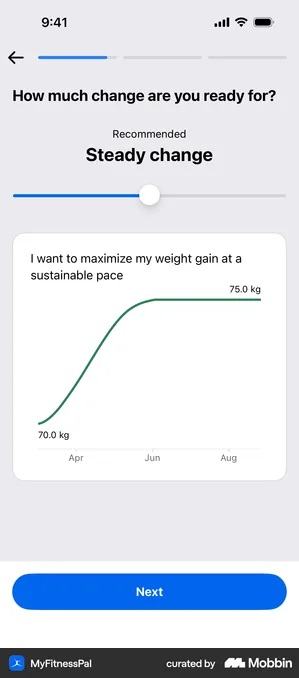
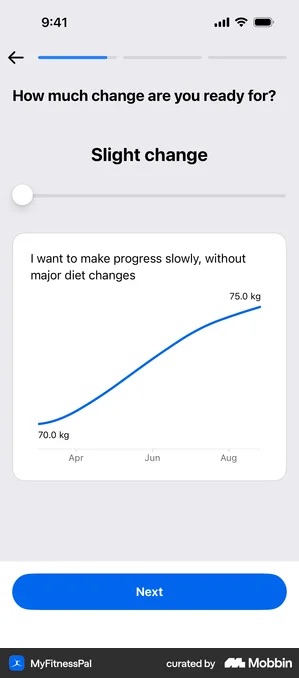
Where to place them
The best micro-commitments happen naturally in the flow of onboarding. They should feel like setup, not interrogation.
Right at the start
Open with a question whose answer configures something. Calm asks “What brings you to Calm? We’ll personalize recommendations based on your goals.”
Headway asks for a daily goal in minutes and answers back in book summaries a month, so the question becomes a preview instead of a preference. And WHOOP’s first question branches the sixteen that follow, with the stakes right there on the screen: GOALS STEP 1 / 17.
WHOOP · the first question that decides the other sixteen
The screen reads “What’s your goal? Choose the option that best describes you” over three options, BE HEALTHIER, IMPROVE FITNESS and OPTIMIZE PERFORMANCE, with “GOALS STEP 1 / 17” above it. The answer routes the sixteen questions that follow. It is not collecting a preference, it is choosing which onboarding the user gets.
The branch has to genuinely shorten the path. The answer has to take questions away, not unlock more of them.
Change only the words and people work it out fast. On a flow that has already shown the number seventeen, every question after that inherits the suspicion.
The better ones tell you why they are asking, right there in the question.
Strava’s birthday screen: “We’ll use this for performance analysis, filtering leaderboards, and to keep younger users safe”. Its gender screen adds “Your gender will not appear on your profile.”
Lovi asks your age and explains it in the same breath: “At different ages, your skin needs different skincare treatments.”
One sentence each. That is the whole cost of not feeling creepy.
Monzo asks about home insurance and tells you where the answer lands: “Your answer helps us tailor what you see next.”
A reason costs one line of copy, and it turns an interrogation into setup.
Declare the length, or offer a way out
If you are going to run long, say so. Calm Sleep prints “1/6”, WHOOP prints “GOALS STEP 1 / 17”, Monarch prints “Step 5 of 6”, Feeld prints “11 of 13”. Headspace and Udemy both decline to commit and promise only “a few questions”.
In the flows I looked at, a progress indicator was close to universal. I could only find six apps that hide the length, against ten that declare it. Hiding it is now the deviation, not the default.
Four versions of the decision are worth naming, because the difference between them is what costs you the user rather than merely annoying them.
Calm Sleep · the count that has to stay true
A numeric counter sits beside the bar, so the user reads a number rather than a filled proportion. Six questions, decided up front. All of which rests on six meaning six, including the screens that come after the questions. A 1/6 that becomes 1/12 after the first answer is the clearest quit signal in an onboarding, because it turns the first promise into a lie, after the fact.
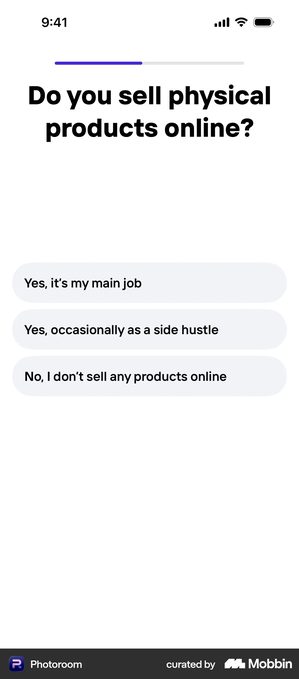
Photoroom · a bar with no numbers and no confirm step
A thin bar filled to somewhere under half, with no count beside it and no back arrow. The question is “Do you sell physical products online?” over three grey pills.
And there is no Next button at all. The tap on an option is both the answer and the advance.
Dropping the confirm step halves the taps and keeps the bar moving, which is right when every question is a single choice.
Then pair it with a bar carrying no number. Now the user cannot tell whether that fill means four more questions or fourteen, and with nothing to confirm, they cannot pause to work it out either. Calm Sleep’s “1/6” costs one label and answers both.
Me+ · the bar that appears and disappears
The same flow shows a progress bar on some steps and drops it on others. It is the most common version of the pattern in what I catalogued, and it reads as an accident rather than a decision. It is fine on the in-between screens, the ones that only show a message: there is nothing to measure, so nothing is claimed.
On a real question it does not. Progress that vanishes reads as progress lost, and the reflex is to tap back and check. Which is the one interaction a long flow cannot afford.
Udemy · no bar, but a way out
Udemy runs its onboarding with no indicator at all and a persistent Save & exit instead. It swaps a promise about length for a promise about escape: leave whenever, keep what you answered. Finimize offers “Skip this step”, Numo offers “Skip onboarding”, and both are making the same trade.
If the flow is genuinely optional and the app works without finishing it, this exit is worth more than any count would be.
So go and tap your own. A way out that does not actually open costs more trust than never offering one.
Monzo is the honest case for hiding the number. One question per screen, a back arrow and nothing else, with later questions branching on earlier answers. Once a flow branches, any total it shows is wrong for somebody.
The risk it accepts is this. With no bar at all, the user’s working estimate becomes “this never ends”. A flow with no visible end gets abandoned earlier than a long one with a count on it.
Jobber · two questions inside one step
One screen, one progress step, two questions. “How many people work at your company (including you)?” over five pills, then “How many years have you been in business?” over five more.
The subhead is what makes it bearable: “We’ll use this information to suggest the right tools and workflows for your team.”
Batching holds up when the two questions are the same kind, so answering both still feels like one decision. Use it to make the bar move faster than the work does and people notice. They measure onboarding in effort, not in steps, and a bar that jumps over a dense screen reads as a trick.
Before any permission request
Ask the user what they want before you ask for camera, notification, or location access. The question creates context that makes the permission feel logical instead of intrusive.
This is settled practice rather than a clever move. Every permission ask I catalogued was primed by a screen of the app’s own, and not one went straight to the raw system dialog. Whatnot even renders two sample notifications on a mock lock screen.
Vocabulary lets you set the frequency and the hours before it asks. What still varies is the half-second afterwards, when iOS drops its own alert on top of your screen.
On Attio’s primer the dialog lands right over the headline, so the user decides while reading Apple’s wording instead of yours. Put your reason high on the screen, not vertically centred.
Cuvva · three reasons, and the third one is marketing
Cuvva’s primer is headed “Get updates and reminders about your policy”, then names exactly what the alerts are for:
“Allow push notifications for a reminder when your policy is about to end, help if there’s ever a problem, and the latest news from Cuvva.”
A “Later” sits alongside it.
Two of those three are things an insurance customer would switch on without thinking. The third one is marketing, and it is the reason the other two get turned off later.
Naming the reason helps, and naming three helps more than naming none. The third one is the problem.
iOS grants one switch for all of your notifications. So a user reading “the latest news from Cuvva” is being asked to accept marketing in order to get the expiry reminder.
Bundling the promotional reason in with the useful ones is how a considered yes turns into the one decline you cannot ask about again.
During the first session
Let users do something before the paywall. Complete one task, set one goal, make one entry. The completion of any action is itself a micro-commitment.
Evernote does the blunt version. Three empty rows and one instruction: “What are three things on your to-do list today?”
No demo, no sample data. You leave onboarding with a note that is actually yours. pliability waits until a session has actually happened and then says so by name, “Way to go, Alex! You just completed your first session”.
Which is why the argument for scripting that moment rather than hoping for it is a strong one. For a flow built out of questions it has a cheap version: put one experience of the value in the first session, using the answers you just collected.
The failure mode is a checklist in place of an action. Revolut Business hands the user six remaining tasks before the account works; Peanut and Deel use a completion percentage. A progress bar is not an aha moment, the point where the app finally proves it was worth downloading. It converts the product into homework.
Before the paywall
Your last micro-commitment before showing pricing should connect directly to what the user said they want. The paywall then confirms a path they’ve already chosen rather than opening a new conversation.
The sharpest version I have seen puts the onboarding itself on the trial timeline, as a completed step. Ten of the eleven end-of-onboarding paywalls I collected run a vertical timeline of three or four dated steps. Only a few count the flow the user just finished as step one.
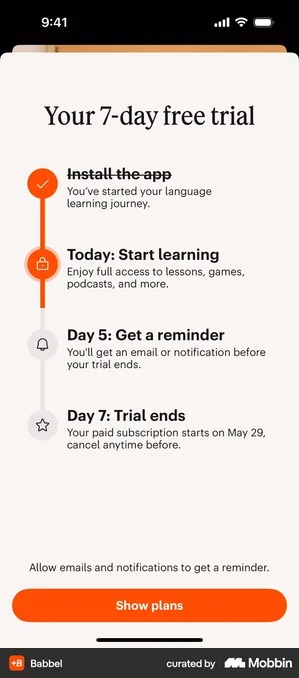
That receipt is worth exactly as much as the flow behind it. If onboarding was three taps, step one reads “Install the app” and the only thing the user has accomplished is arriving, which frames the price badly.
What to avoid
Asking for something you will never use
The clearest case is “How did you hear about us?”. It was the easiest pattern to find in the whole onboarding library: one search returned twelve apps, across budgeting, fitness, meditation, dating and travel. Not one of them changes what the user sees on the next screen.
That is the failure this article is about, in its purest form. A micro-commitment is a small payment of effort, and the person making it expects something back. Take the effort and return nothing and you have not built investment. You have spent it.
The same thing happens at a larger scale at the end of a flow, on a results screen that was not computed from anything the user typed. Of eleven I collected, three were. The full count, the twelve attribution screens, and the two apps that show the identical 86% under the same shaped curve, are all in personalisation in onboarding, which is where that question belongs.
Commitment to the wrong thing
If your micro-commitments focus on features (“choose your color scheme”) rather than outcomes (“choose your goal”), you are building investment in your UI, not in their results.
I have no test that isolates this, so take it as my judgement rather than a measured finding. But the apps that put an outcome question first are also the ones with something to show back on the next screen, and that part you can check yourself.
From our work · Breath training app
The clearest test of this we have run was on a breath training app. The redesigned onboarding opened with a goal question and used a dynamic selection UI instead of static lists.
It revealed information bit by bit rather than all at once, and it added social proof, meaning visible evidence that other people use it and it works for them, plus achievement framing.
Those are micro-commitments. The user states a goal, makes choices, and sees the flow respond. An A/B test showed a 16.5% increase in free-to-trial conversion (October 2024 to January 2025). The work in that engagement was on the onboarding screens.
By the pricing screen, the app was not asking a stranger for money. It was asking someone who had already described what they wanted.
Checklist
- Every question you ask changes something the user sees later, and you can name the screen
- The first question configures the product, not the growth report
- If the flow is long, the length is declared and the declared total never grows, or the flow offers a real way out, not a decorative one
- Any results screen is computed from the answers, or is placed before the questions
- Each permission ask is primed, with the reason high on the screen rather than centred
- At least one “do something” moment before the paywall, not a completion checklist
- The paywall references what the user said they want, ideally as a completed first step
Got questions? I’ve got answers
How many questions should onboarding ask?
There is no safe number, and the popular rule of three is not supported by what shipping apps do. Nine onboarding flows I captured from big consumer apps run 14 to 30 screens, median 19, counting the splash, the account screens and the closing paywall. Ask as many questions as you can answer back: the useful test is whether the user can later point at something in the app and say it is there because of what they said.
Are micro-commitments a dark pattern?
Only when they serve you rather than the user. Asking someone their goal so the app can adapt is genuine setup. Asking questions whose answers change nothing is manipulation. The test is whether the user gets something back from answering.
Do micro-commitments actually change conversion?
In our A/B test on a breath training app, an onboarding rebuilt around a goal question, a dynamic selection UI, progressive disclosure and social proof raised free-to-trial conversion by 16.5%. The work in that project was on the onboarding screens.