How Do You Get Users to Actually Accept Notifications?
You download a new app. You are three screens in, you have not seen anything useful yet, and a little grey box jumps in front of you:
“App Would Like to Send You Notifications.”
What do you tap?
Yeah. Me too.
Now here is the part that hurts, and most founders find it out too late. You only get asked once. Not once a session. Not once a week. Once, for the whole life of that install.
After a “Don’t Allow” the notification permission is gone. The only way back is the user going into Settings and switching it on themselves, and I have honestly never met anyone who does that.
I know, I sound like a drama queen. Stay with me, this one is worth it.
Apple says it plainly:
“The first time your app makes this authorization request, the system prompts the person to grant or deny the request and records that response. Subsequent authorization requests don’t prompt the person.”
So your one shot is not the grey box. Apple owns that box and you cannot change a word of it. Your one shot is the screen you show right before it.
That screen is what this article is about.
What follows is what that screen actually says in shipped iOS apps: Whatnot, Vrbo, Cuvva, Lovi, Vocabulary, Jira Cloud, State Farm, Runna, Attio and Pillow. And where the advice everyone repeats collides with Apple’s own guidelines.
In short
- iOS shows the notification prompt once. The system records the answer, and every later request returns that stored answer without showing anything at all.
- Apple documents a second route, provisional authorization: permission is granted with no prompt, and the notifications arrive quietly in Notification Center for the user to judge on their merits.
- Asking in context is Apple’s own documented advice, not just a growth tactic. Its example is a task app requesting authorization after the person schedules a first task.
- Apple’s guidelines ask a pre-permission screen to carry one button, titled Continue or Next, rather than a custom Allow paired with a way out.
- The system alert lands on top of your primer, so the reason has to sit high on the screen: on the Attio capture it covers the headline entirely.
First, the number everyone quotes
You will see an “average iOS opt-in rate” quoted everywhere. That just means the share of people who tap Allow. This article used to carry one of those numbers too.
I took it out. Every version of it comes from a push-notification company measuring its own customers. And the versions disagree with each other by more than any design change you are likely to make.
A benchmark you cannot act on is worse than no benchmark. You would spend a week trying to hit somebody else’s number.
The useful figure from that same kind of source is the spread. Pushwoosh’s 2025 benchmark, drawn from more than 600 apps over 2024, puts iOS opt-in at 23.01% for hypercasual games and 79.87% for business apps. A category difference of roughly three and a half times swamps the average. Your own opt-in rate is the only one worth designing against.
The one thing that is not a matter of opinion
iOS is stricter than most write-ups admit, and looser in one place they usually miss.
Stricter: one prompt, recorded, then silence. Repeat calls to requestAuthorization return the stored answer without showing anything.
Looser: Apple documents a second route called provisional authorization. Request it and permission is granted automatically, with no prompt at all. The catch is that the notifications arrive quietly.
They never make a sound. They never appear as a banner. They never reach the lock screen. They only land in Notification Center, and each one carries buttons asking the user to keep or turn off that app’s notifications.
Apple’s framing is that people “can then evaluate the notifications and decide whether to authorize them” a trial, judged on the actual notifications rather than on your promise about them. It is the one legitimate way to ask twice.
Context is Apple’s advice, not just good practice
The case for asking in context is usually made as a growth tactic. It is also written into Apple’s developer documentation, with an example that is almost exactly the one designers reach for:
“Make the request in a context that helps people understand why your app needs authorization. In a task-tracking app that sends reminder notifications, you might make the request after the person schedules a first task. Sending the request in context provides a better experience than automatically requesting authorization on first launch, because people can see the purpose your app’s notifications serve.”
The design version: a bedtime story app doesn’t ask for notification permission. It asks what time the kid goes to sleep, the user picks a time, and only then does the prompt appear. The user isn’t granting a permission, they’re switching on the thing they just configured.
Placing the ask inside the run of taps onboarding already produces makes it read as one more step rather than an interruption.
That is my judgement, not a measured result. I have no data on what the same ask does in a settings screen three days later. Neither does anyone who has quoted a number at you about it.
The pre-permission screen, and what Apple actually says about it
One word before we go on, because everything here depends on it. A primer is simply your own screen, shown just before the real iOS box. Yours can say anything you like. Apple’s cannot be changed, not one word of it.
So the primer is the only part of this conversation you actually control.
Apple does allow a screen of your own first:
“If it’s essential to provide additional details, you can display a custom screen or window before the system alert appears.”
So far so good. Then comes the advice everyone repeats: put a “Not now” next to your “Yes”, so a soft decline does not burn the prompt.
That is the part Apple argues against.
The Human Interface Guidelines, Apple’s own design rulebook, are specific. One button on the primer. Title it “Continue” or “Next”, not “Allow”. And no way out:
“don’t provide a way for people to leave the screen or window without viewing the system alert — like offering an option to close or cancel.”
The stated reason is manipulation. A custom button that mirrors the alert’s Allow makes people more likely to tap the real one without meaning to.
Lovi · the only primer in my file that uses Apple’s button word
Six notification primers are transcribed in my teardown library. Five title the main button some version of Allow: Whatnot’s Allow Notifications, Vrbo’s and Cuvva’s Allow notifications, Vocabulary’s Allow and Save, Jira’s Turn on mention notifications. Lovi’s says Next, with Not now beside it, the exact shape the guidelines ask for, on the one screen you would not expect to find it.
Its body copy is the weaker half:
“Allow notifications not to forget about your rituals — We won’t spam, pinky promise!”
That is a promise about what you will not send. The user cannot price it and you cannot prove it.
Before you take all of that as law, two things. This is the part that gets quoted wrong most often, so it is worth slowing down for.
First one. Those guidelines are not actually about notifications. Look at what Apple attaches them to:
“custom views that display before system alerts that request permission to access protected data and resources, including camera, microphone, location, contact, calendar, and tracking”
Read the list again. Camera. Microphone. Location. Contacts. Calendar. Tracking.
No notifications.
So when someone quotes the one-button rule at you for a notification screen, they are borrowing a rule from a different room. It might still be good advice. It is just not the law they think it is.
Second, the language about App Store rejection sits in the app-tracking section, aimed at screens that imitate the system alert or offer incentives. I have not found Apple saying it rejects apps for putting a “Not now” on a notification primer, and I am not going to imply it does.
Now the other direction. For marketing pushes, Apple’s notification guidance requires a screen with both answers on it:
“Create an alert, modal view, or other interface that describes the types of information you want to send and gives people a clear way to opt in or out.”
So the soft decline is mandatory for marketing notifications and discouraged in the general pre-alert pattern. That tension is real, it is Apple’s, and the sensible reading is that a soft decline is fine on a notification primer and not fine on a tracking one.
What the primers actually look like
I went through every permission ask in a set of captured onboarding flows for my own teardown library. Not one went straight to the raw iOS dialog.
So priming is the default, not the clever move. The interesting question is not whether to use a primer. It is what the primer says, and what happens in the half-second after the tap.
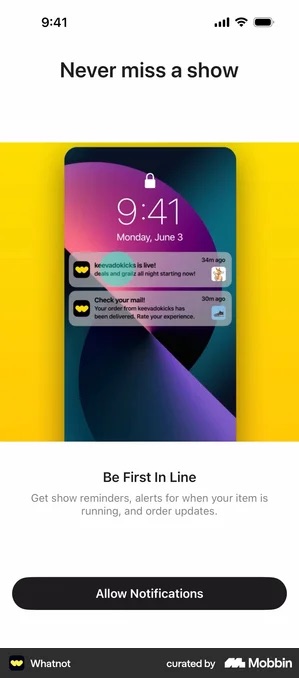
Showing the real thing only helps if the fake notifications are the ones you will actually send. That screen is a sample, and it sets the expectation you get judged against. Show the best-case notification and then send promotions, and the first one that breaks the promise is when the permission gets switched off.
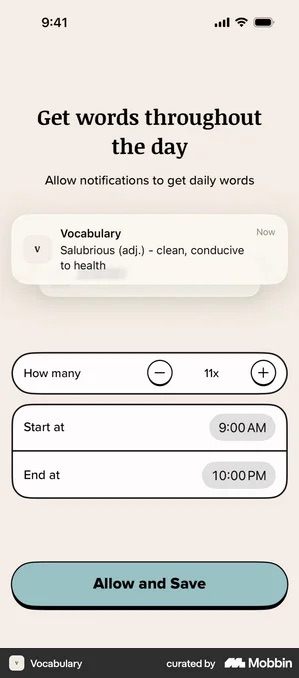
Answering the volume objection before it is raised is a strong move for productivity and learning apps, where what people fear is the frequency rather than the notifications themselves. It also shows how far the defaults can drift from the advice. I would not ship eleven a day. Vocabulary does, and it does it on the same screen where it asks for trust.
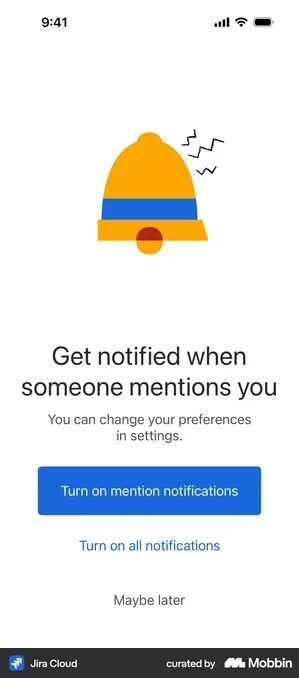
iOS grants notifications all or nothing. There is no “mentions only” switch in the permission itself, so you have to honour that promise on your own server afterwards.
Offering less is a strong reason to say yes. It is also a promise the user cannot re-scope if you break it.
Picture it. Someone picks mentions-only. A month later they are getting everything. The only fix available to them is turning notifications off completely.
Google Fit · the decline given the same treatment as the accept
The health primer explains itself in three short paragraphs. Then two buttons, the same size and the same filled blue. Not now on top, Connect to Apple Health underneath. There is a Cancel link in the top left as well.
Nothing in the layout points at the yes.
Refusing to steer is right when the permission is genuinely optional and you would rather have an honest no than an accidental yes you can never ask about again. When the permission is doing the real work, a neutral layout does not save anybody. It just moves the drop-off to the empty screen two steps later.
Cal AI · the permission asked as one more question
Same progress bar and back arrow as the questions before it. So it reads like one more onboarding step, not like a permission ask.
“Connect to Apple Health · Sync your daily activity between Cal AI and the Health app to have the most thorough data.”
The main button is a dark filled Continue. Not now sits below it, in plain text.
Worth noting against the paragraph above: neither health primer in my file uses the button word Apple warns about, where five of the six notification primers do.
Borrowing the look of the flow around it works because the ask reads as one more step in a run the user is already committed to, not as an interruption.
The catch is when momentum is the only reason they tapped. A permission granted without thinking is the one switched off after the first push. And switching off is the half of this the user controls and you do not.
Jira Cloud and Oura · naming the exit before asking
Under its headline Jira adds one line: “You can change your preferences in settings.”
Oura’s health primer does the same: “Keep your personal and sleep data in sync with Apple Health. You can change these settings at any time.”
Both tell the user the decision is reversible before asking them to make it. It is the cheapest thing on either screen.
It is also true, but read it from your own side. What stays reversible is the user’s half: they can switch the channel on and off in Settings whenever they like. You cannot. Once the alert has been answered, your ask is spent for good.
The half-second nobody designs
Every primer ends with the system alert landing on top of it. That alert has Apple’s wording, not yours.
It reads identically on all five handoff captures in my file: Attio, Atoms, Pillow, Jira Cloud and Rappi.
“[App]” Would Like to Send You Notifications. Notifications may include alerts, sounds, and icon badges. These can be configured in Settings.
So the user reads your line about never missing a show, then a sentence about icon badges. The decision gets made on the second one.
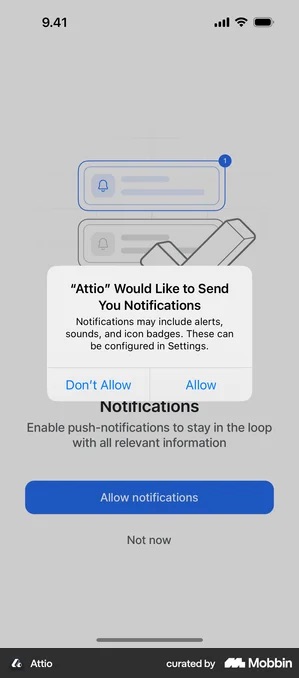
Pillow and Atoms · two live decisions in one frame
Attio loses its headline. Pillow loses the middle of its explanation: the alert lands over the body copy, leaving a truncated sentence wrapped around it while Skip and Continue stay visible below. The screen now carries two decisions at once, Apple’s Don’t Allow / Allow, and the app’s own pair underneath. Atoms has the same thing in miniature: its Maybe later is still readable under the dialog.
Your buttons are down there either way. What decides whether that matters is whether the user has already used one. Fire the alert from a tap on your own button and they have. Fire it on screen load and nothing has been read yet, and the reflex on an unexplained system dialog is Don’t Allow.
What to avoid
Don’t ask on the first screen. The user doesn’t know you yet, and Apple’s own documentation says the same thing in more measured language.
Don’t be vague. The primers in my file sit on a ladder, and you can hear the rungs in the copy.
Cuvva, Vrbo and Lovi · one ask at three levels of specificity
Cuvva names three things:
“Allow push notifications for a reminder when your policy is about to end, help if there’s ever a problem, and the latest news from Cuvva.”
Two of those would justify a permission on their own. The third is marketing riding in behind them, and it is the one that gets notifications switched off later.
Vrbo is a rung down: “Stay in the know — Get important updates and reminders about your booking when you turn on notifications.”
The reason is tied to something real, the user’s booking. But the content is still a category, not a thing.
Lovi is the bottom rung and promises only an absence: “We won’t spam, pinky promise!”
Here is the difference. A show going live. A daily word. A mention of your name. A policy about to expire. Those are things. “Important updates” is not.
Think before batching permissions, but batching is not automatically wrong
This article used to say that spreading requests out converts far better than a wall of prompts. I have cut that, because I have no conversion data for either shape and neither does anyone quoting it at me. What I can report is what the batched screens actually say.
State Farm and Runna · a batch that survives being read
State Farm: “Required permissions: Turn on Bluetooth · Allow location. These settings are needed to collect accurate driving data so State Farm can calculate your discount. We don’t sell your information.” Two permissions, a status tick against each, one named payoff, and Skip for now still on the screen.
Runna batches four in the same shape: “Before starting, you must grant Runna permissions to access your location and activity type data”. Then the four: Location, Motion and Fitness, Apple Health (optional), Strava (optional).
Both hold up, for two reasons. The permissions genuinely are a set, and each screen says which ones are not required. Runna marks two optional. State Farm ties the pair to a specific thing the user gets.
A batch stops being defensible when “required” is doing the persuading. Users check that. Once one label has been caught lying, the others stop being believed.
Don’t send garbage after they accept
The fastest way to get notifications turned off is irrelevant or too-frequent alerts. What counts as relevant depends on what you sell.
Alice Muir, a subscription consultant previously at Phiture, makes the point about trial reminders, and it applies more widely. If someone wants one job done now, a promised push two days later is useless to them.
Habit products earn a daily notification. Utilities usually don’t.
The numbers that matter
Opt-in rate. What share of users accept? Track it against your primer’s own accept rate, so you can tell a weak primer apart from a weak system-alert moment.
Disable rate. Are users turning notifications off after accepting? If so, the content or the frequency is wrong, and the primer is not the thing to fix.
Retention among opted-in users. Worth watching, but do not read it as a return on the permission. People who accept notifications were already more interested in your app than people who declined, so the gap is mostly selection, not effect. The version of this article that quoted a “3–10x retention” multiple was citing a page that no longer exists, and the causal reading was wrong anyway.
If you want a number you can trust, hold the permission constant and test the notifications.
Notification opt-in checklist
- Ask in context, after the user sets up something the notification serves
- Primer names a specific notification, not a category
- The reason sits high on the screen, above where the system alert will land
- The alert is triggered by a tap, never on screen load
- Button not titled “Allow” Apple asks for “Continue” or “Next”
- Provisional authorization considered for anything that can survive being quiet
- Any narrower promise the primer makes is honoured server-side
- Tracking opt-in rate, primer accept rate and disable rate separately
Sources
Platform behaviour is quoted from Apple’s Asking permission to use notifications and from the Human Interface Guidelines on Privacy and Managing notifications. The opt-in spread is from Pushwoosh’s 2025 benchmark. Screens are from my own onboarding teardown library, credited and linked individually above.
Got questions? I’ve got answers
What is a good notification opt-in rate on iOS?
There is no useful single average. Every widely quoted figure comes from a push-notification vendor measuring its own customers, and the versions disagree with each other by more than any design change is likely to move. The more honest figure is the spread: Pushwoosh’s 2025 benchmark, drawn from more than 600 apps, puts iOS opt-in at 23.01% for hypercasual games and 79.87% for business apps. Category differences of roughly three and a half times swamp the average, so compare yourself with apps in your category rather than with an industry number.
Can you ask for notification permission more than once on iOS?
No. iOS shows the system alert once, records the answer, and after that repeat calls to requestAuthorization return the stored answer without displaying anything. That is why the single prompt is worth designing for. There is a second route, though: Apple documents provisional authorization, which is granted automatically with no prompt at all. Notifications sent under it are delivered quietly, never making a sound, appearing as a banner, or reaching the lock screen, and the user is asked later whether to keep them.
Should a pre-permission screen have a “Not now” button?
Apple’s Human Interface Guidelines say no. They tell you to include only one button on a screen shown before a system alert, to title it Continue or Next rather than Allow, and not to provide a way to leave without viewing the alert. That is the opposite of the two-button primer usually recommended. Two caveats on scope: Apple attaches this guidance to permissions for protected data such as camera, microphone, location, contacts and calendars, and notifications are not in that enumerated list.
When is the best moment to ask for notification permission?
Immediately after the user configures the thing the notification is for. This is Apple’s own documented advice, not only a growth tactic: its example is a task-tracking app requesting authorization after the person schedules a first task. A bedtime story app should ask what time the child sleeps, let the user pick a time, and only then trigger the prompt, so the user is switching on something they just set up rather than granting an abstract permission.
Do notifications improve retention?
Be careful with this one. Users who accept notifications tend to retain better, but they were already more interested in the app than the people who declined, so most of the gap is selection rather than effect. Figures claiming notifications multiply retention several times over generally compare those two self-selected groups and read the difference as causation. Track opt-in rate, the rate at which users disable notifications after accepting, and retention among opted-in users, but do not treat the last as a return on the permission itself.