App Store Rejections: The Guidelines Behind the Common Ones
You submit. You wait a day. You get a message naming a guideline number and almost nothing else.
So now you are reading a legal document at eleven at night, trying to work out which sentence you broke.
I have been in that thread with clients more than once. The pattern is always the same: the rejection is rarely about something subtle. It is about a line that reads like advice until you notice it says must.
So the mistake is treating the App Review Guidelines as a style guide. Most of it is. A handful of lines are not, and those are the ones that come back.
What follows is the guideline numbers worth knowing by heart, quoted. Plus five real apps handling the one requirement I see missed most often: account deletion, mandatory since 2022 and still shipped without.
In short
- Apple publishes the App Review Guidelines in full. Almost every rejection names a number in them, and the number tells you what to fix.
- 5.1.1(v). If your app lets people create an account, it must let them delete it from inside the app, not by email. The five deletion screens below split cleanly: three say deletion does not cancel the subscription, one makes you cancel first.
- 3.1.2. A subscription has to disclose its title, length, what you get and the price per period, before the purchase and in the metadata.
- 2.3.3. Screenshots must show the app in use, not title art, a login page or a splash screen.
- 5.6.1. Filtering who gets asked for a review is named alongside paid and fake feedback, with removal from the Developer Program attached.
Account deletion is the one I see missed
Since 2022, an app that offers account creation has to offer account deletion inside the app. Guideline 5.1.1(v).
It catches people because it is a plumbing question rather than a design one, and plumbing gets left to the end.
On a subscription app it also comes with a trap. Deleting an account does not cancel an App Store subscription. Apple holds that billing relationship, not you.
So the user who deletes their account believing they have stopped the payments is going to get charged, and then they are going to leave a review about it.
Here is how five apps handle exactly that.
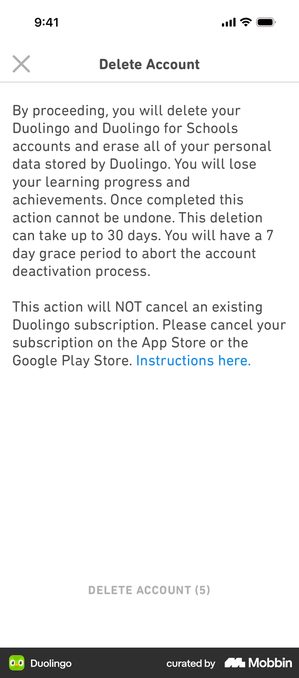
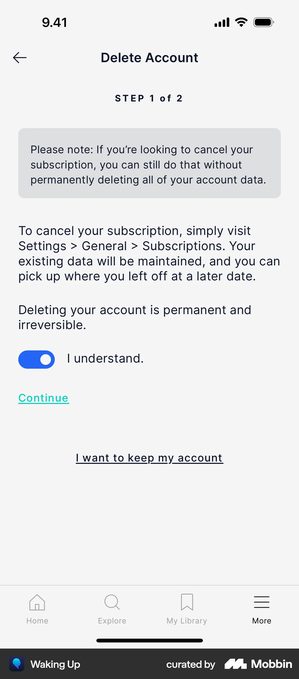
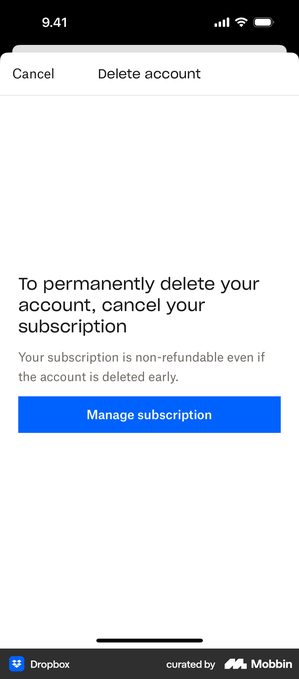
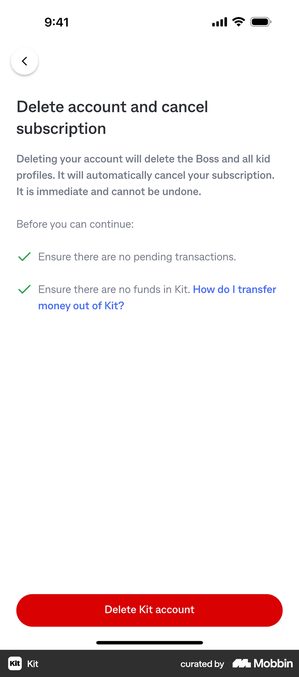
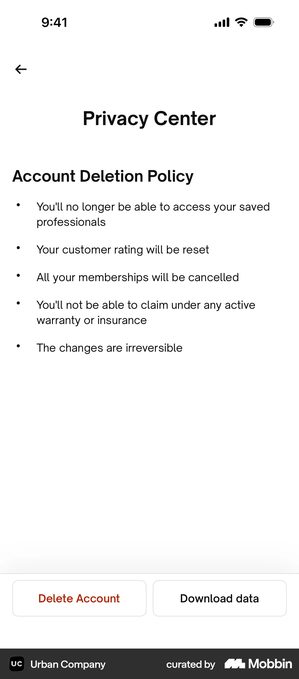
Three of the five state the relationship between deletion and billing explicitly. That is the line worth copying, and it costs one sentence.
The other guidelines that come back
These are the numbers worth reading before you submit rather than after.
3.1.2, what a subscription screen has to say
A subscription must disclose the title, the length of the period, what the subscription includes, and the price per period. Before the purchase, and in your App Store metadata.
That is why the dated trial timeline has spread so widely. It is a readable way to satisfy a disclosure requirement. Which is also why the apps that run one tend to look more honest than the apps that do not.
2.3.3, screenshots show the app in use
“Screenshots should show the app in use, and not merely the title art, login page, or splash screen.”
An empty state is a risk twice over. It is the weakest thing you could show a buyer, and it is the thing the reviewer is told to look for. What to put there instead is its own article.
2.1, the app has to be finished
Placeholder content, dead links, a feature that crashes, a demo account that does not work. App Review cannot see your roadmap, and “that is coming next sprint” is not a state the binary can be in.
The one that catches teams repeatedly is the test account. If your app needs a login, you supply credentials in App Store Connect. They have to still work when a human opens them two days later.
5.6.1, how you ask for reviews
“If we find that you have attempted to manipulate reviews, inflate your chart rankings with paid, incentivized, filtered, or fake feedback, or engage with third-party services to do so on your behalf, we will take steps to preserve the integrity of the App Store, which may include expelling you from the Apple Developer Program.”
The word to notice is filtered, sitting in a list with paid and fake.
The screen that asks “are you enjoying the app?” and sends only the happy answers to the real prompt is the filtered one. When to ask instead has a better answer.
4.3, your app looks like several other apps
Spam, in Apple’s words. If you shipped a template with the colours changed, or you have several near-identical apps under one account, this is the one that is waiting.
It is also the hardest to argue your way out of. The judgement is about your app next to other apps, and you cannot see what the reviewer is comparing it with.
What to do when it happens
Read the guideline number first, not the message. The message is a summary; the guideline is the requirement, and it usually tells you exactly which sentence you failed.
Then fix it and resubmit, rather than arguing, unless you genuinely think the reviewer has the wrong end of it.
Resolution Center replies are read by people. A short factual note saying what changed moves faster than a long one explaining why the rejection was unfair.
And treat the first rejection as information about your submission rather than about your app. Most of these are one screen, one sentence or one working test account away from approved.
Pre-submission checklist
- Account deletion exists in the app, per 5.1.1(v), not by email
- The deletion screen states whether it cancels the subscription, and where to cancel if not
- Subscription title, period length, contents and price per period on screen before purchase per 3.1.2, and the same terms in the App Store metadata, not only in the binary
- Screenshots show populated app UI, per 2.3.3, with no splash or login frame
- No review prompt is filtered by a satisfaction question first, per 5.6.1
- A working test account is in App Store Connect, and somebody has just logged in with it
- No placeholder copy, no dead links, nothing behind a flag you forgot to turn on
- Permission prompts explain the reason, and the app works if the answer is no
Got questions? I’ve got answers
Why do apps get rejected from the App Store?
Almost always against a specific numbered guideline, and the number is in the rejection message. The ones that come back most are an incomplete binary (2.1), screenshots that do not show the app in use (2.3.3), subscription terms not disclosed before purchase (3.1.2), and a missing in-app account deletion (5.1.1(v)).
Does my app need an account deletion option?
Yes, if it lets people create an account. Guideline 5.1.1(v) has required deletion from inside the app since 2022. An email address or a support form does not satisfy it.
Does deleting an account cancel an App Store subscription?
No. Apple holds that billing relationship, so the subscription continues until the user cancels it in their App Store settings. Three of the five deletion screens in this article say so explicitly, and Duolingo gives it a paragraph of its own. Without that sentence, a user who deletes their account will be charged again and will say so in a review.
What should I do after an App Store rejection?
Read the guideline number rather than the summary message, because the guideline names the requirement you missed. Then fix and resubmit instead of arguing, unless the reviewer has genuinely misread something. Most rejections are one screen, one sentence or one working test account away from approval.