When Should You Ask Users for an App Store Review?
Somebody is deciding whether to download your app. Before they read one word you wrote, they look at a number of stars and how many people gave them.
So you need reviews. And most of us handle that in one of two ways: never ask at all, or ask at the exact worst moment, which is usually about four seconds after the app opens.
Before any advice, one thing out loud: almost every number attached to this topic is folklore.
You have probably seen the line that going from 3.5 to 4.0 stars lifts downloads by about 30%. Follow it back and it is ASO blogs, meaning app store optimisation blogs, quoting each other. The same blogs will sell you 50% and 89% for the identical jump.
RevenueCat’s State of Subscription Apps 2026, across more than 115,000 apps, reports no ratings data at all. So this article carries no conversion percentages. I could not source a single one.
What is documented is Apple’s side, in its own words, and that is the half most articles get wrong.
So: Apple’s three rules quoted in full, the sample project it ships that contradicts the popular advice, the guideline that turns the happy-path filter from good manners into a rule violation, and three apps asking at the right moment.
In short
- Almost every number attached to this topic is folklore: the familiar rating-lift figures trace back to blogs quoting each other, and RevenueCat’s 2026 report across more than 115,000 apps carries no ratings data at all.
- Apple caps the prompt at three displays per user per 365 days, not three calls, so you never find out which of your calls spent one.
- What Apple bans is your own prompt, not your own link: its sample project ships a “Rate this app” row in settings built on a deep link with
action=write-review, and a link the user chose to tap does not spend a display. - The satisfaction gate that routes happy users to the store runs into guideline 5.6.1, which lists filtered feedback beside paid, incentivized and fake.
- Ask at the end of something that worked: Apple’s own sample waits until the user has completed a three-step process at least four times, then pauses on the completion screen before it calls the API.
What Apple actually documents
The system shows the prompt at most three times a year
Apple’s StoreKit documentation on requesting reviews puts it plainly:
“Be aware that the system displays the review prompt to a user a maximum of three times within a 365-day period.”
Apple, Requesting App Store reviews
Read what that caps. It caps displays, not calls. You can call the API more often than three times; the prompt simply will not appear. So the budget you are managing is not “three API calls”, it is “three chances the user actually sees something”, and you never find out which calls spent one.
You pick the moment, the system decides whether to honour it
The same page: “You can determine when and where your app displays the prompt to request a review.” The timing decision is genuinely yours. Whether any individual call surfaces is not, and the API gives you no callback to say either way.
Some users have switched it off completely
Also Apple:
“remember that people can disable requests for reviews from ever appearing on their device.”
However good your moment is, a share of your audience will never see it, and you cannot detect them.
The principle: ask at the end of something that worked
Apple lists its own best practices on that page, and the first one is the whole principle in a sentence:
“Make the request at a time that doesn’t interrupt what someone is trying to achieve in your app, for example, at the end of a sequence of events that they successfully complete.”
The other two are the ones people ignore:
“Avoid showing a request for a review immediately when a user launches your app, even if it isn’t the first time it launches.”
“Avoid requesting a review as the result of a user action.”
Read that second one again. It is awkward for most of the advice you will find.
Not during onboarding
The popular advice says ask during onboarding, because that is when excitement peaks. And that if the user does not pay at the paywall, you should at least take a review off them on the way past.
Apple’s documentation argues the opposite, and its sample project is worth reading literally.
That sample waits for three things. The person has completed a three-step process at least four times. They are on a version of the app they have not already been prompted on. And they pause on the completion screen for a few seconds. Only then does it call the API.
Apple says the number four is arbitrary and you should pick your own. The shape is the point, and Apple gives its reasoning. Delaying the call means the app asks
“when people are more experienced at using the app and can provide better feedback.”
My own read on top of that: a first-session user has an opinion about your onboarding, not about your app. That is what they will write, and you will be reading it for the next year.
The satisfaction gate, and the word Apple uses
You know the pattern. A screen asks something like “How’s your experience so far?” Happy answers go to the real App Store prompt. Unhappy ones go to a private feedback form.
It is everywhere, and it is usually presented as good manners rather than as a tactic.
Two things in Apple’s own text complicate that, and neither is quoted much.
First, the business-practices preamble of the App Store Review Guidelines:
“If we find that you have attempted to manipulate reviews, inflate your chart rankings with paid, incentivized, filtered, or fake feedback, or engage with third-party services to do so on your behalf, we will take steps to preserve the integrity of the App Store, which may include expelling you from the Apple Developer Program.”
Apple, App Review Guidelines 5.6.1
Filtered is sitting in that list, between incentivized and fake. A screen whose entire job is to filter which users are allowed to reach the store is at minimum arguably the thing that sentence describes.
Second, the gate is built out of precisely the trigger Apple tells you to avoid. Tapping “Love it!” is a user action, and “avoid requesting a review as the result of a user action” is on Apple’s own best-practice list.
Neither of those is Apple naming the pattern and banning it, and plenty of shipping apps use it. But “this isn’t manipulation, it’s routing” is a claim about somebody else’s rules, and their rules use a different word for it. So here is my position rather than a fact: keep the feedback route, drop the gate.
Give unhappy users an obvious way to reach you that is always there. A support row in settings, a prompt after a failed action.
Then choose your review moment on evidence that the app actually worked for them, rather than on a self-report you collected thirty seconds earlier. You catch the complaints either way. You just have not built a filter in front of the store.
The rest of Apple’s rules
Custom prompts are out, but one link is in
Guideline 5.6.1:
“Use the provided API to prompt users to review your app; this functionality allows customers to provide an App Store rating and review without the inconvenience of leaving your app, and we will disallow custom review prompts.”
What that bans is your own prompt. It does not ban a “Rate this app” row in settings that the user goes looking for. Apple’s own sample project ships exactly that, as a deep link to the App Store page with action=write-review on the end.
Prompting is the API’s job. A link somebody chose to tap is a different thing, and it doesn’t spend one of your three displays.
Peanut · both routes shipping in one app
Peanut’s settings list carries a “Rate us on the App Store” row under a spread-the-word heading, next to Invite friends rather than anywhere near a prompt.
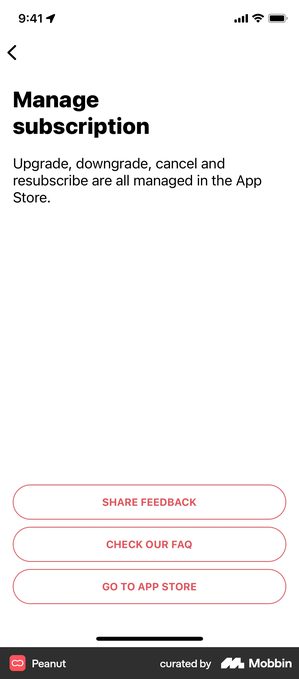
Its Manage subscription screen exists because the app cannot process an iOS cancellation itself. It ends in three outlined buttons of identical weight: “SHARE FEEDBACK”, “CHECK OUR FAQ”, “GO TO APP STORE”.
That is the two halves of this article built as furniture rather than as interruptions. The rating row is user-initiated, so it costs none of the three displays and cannot be accused of filtering. The feedback route sits beside the exit at the same weight, which is how an unhappy user reaches you without a screen deciding first whether they qualify.
What both get right is that neither is a prompt. The user went looking for them, which is the one route Apple’s guideline leaves completely open.
No incentives, and no gating access on the ask
The manipulation clause above names “incentivized” feedback alongside paid and fake. And guideline 3.2.2(x) is separate again:
“Apps must not force users to rate the app, review the app, download other apps, or other store-related actions in order to access functionality, content, or use of the app.”
So “rate us and get 50 free credits” is not a grey area. Neither is putting the ask in front of a feature.
Milestones worth spending a prompt on
Apple gives you the shape, repeat successful completions, then a pause, but not the specific trigger. These are the ones I reach for, and they are judgement rather than benchmark:
- After the user completes the core action for the third or fourth time, not the first
- After they finish something with a visible end: a course, a plan, a week’s streak
- After they share something out of the app, which is a stronger signal than any survey answer
- Never after an error, a crash, a failed payment, a sync failure or a long loading screen
The common thread is that the trigger is evidence, not opinion. Sharing, finishing and repeating are things the user did. “How are we doing?” is something you asked.
Most apps already ship the screen Apple is describing. It is usually the one at the end of a streak day.
Speak, Alma and Paired · the completion beat you already built
Each of these names one small unit and then celebrates finishing it. Speak: “Don’t Lose Your Record! Do just one lesson today to keep your record!” Alma: “Track one item to keep your streak.” Paired: “Answer a conversation today to keep your communication strong!”
A language lesson. A tracked item. A question answered with a partner. Three products in three different categories, and in each one the user lands on a screen that exists only because something got finished.
That screen is the moment Apple’s sample project waits for, and you do not have to build it. What you do have to do is check what is already on it. In my retention teardown the same beat is usually spent on something else: Duolingo puts a Streak Freeze refill there, priced in currency, and Finch puts a paid repair.
Your three displays a year are competing with whatever you put on that screen first, so the honest question is not when to ask but what the ask is displacing.
Being straight about the limit: none of these apps was observed asking for a review at that moment. The teardown records what the screen says, not what fires after it. The evidence here is about where the moment is, not about anyone having used it for this.
What you can and cannot measure
Most articles on this topic quote a prompt acceptance rate. You cannot compute one. The API does not tell you whether the prompt was displayed, so you know how many times you asked and nothing about how many times anybody was asked. Dividing reviews by calls produces a number, but not that number.
What you can actually watch:
Ratings volume per day in App Store Connect, against the date you changed the trigger. It is a before-and-after on real data, and it is the honest version of the metric everybody claims to have.
Rating distribution. If your average sits below 4.0 once the timing is sane, the timing was never the problem.
What the five-star reviews say. Ben Gammon of Ladder, in RevenueCat’s 2026 report, makes the case for working backwards from them. Read what people praise, find the results that matter, then build the product loop around delivering those results every time.
The reviews are research. Not just a number on a page.
How big apps put those reviews to work
Asking at the right moment gets you the rating. Putting it to work is a separate decision, and most apps skip it.
Across 115,000+ apps, RevenueCat counts testimonials on 5.9% to 16.9% of paywalls depending on the category. Shopping highest, Photo & Video lowest.
That is a prevalence figure, not a conversion one. These are the minority that do it, all paywall screens from my own teardown library.
Runna and QUITTR · the count does the work, not the score
Runna leads with “30,000+ reviews”. QUITTR shows 4.8 from 140K users, under the line “Join over 1,000,000 users! Become porn free and regain control over your life.” In both cases the volume is carrying more weight than the score, because almost every app claims something above 4.5.
Both are quoting a number somebody else is holding, which is what separates a citation from a compliment. If you have the volume, the volume is the claim.
Moonly · three kinds of proof before any price
A stat bar first, 10 million souls, 31,000 reviews, Apple’s Editor’s Choice, and press mastheads below it: ELLE, GLAMOUR, VOGUE. All of it before the plan appears.
Editor’s Choice is worth surfacing because you cannot buy it, which is exactly why readers weight it differently from a star average. Decorative press logos, with no coverage behind them, undo all of it.
TIDE · the same app, two different numbers
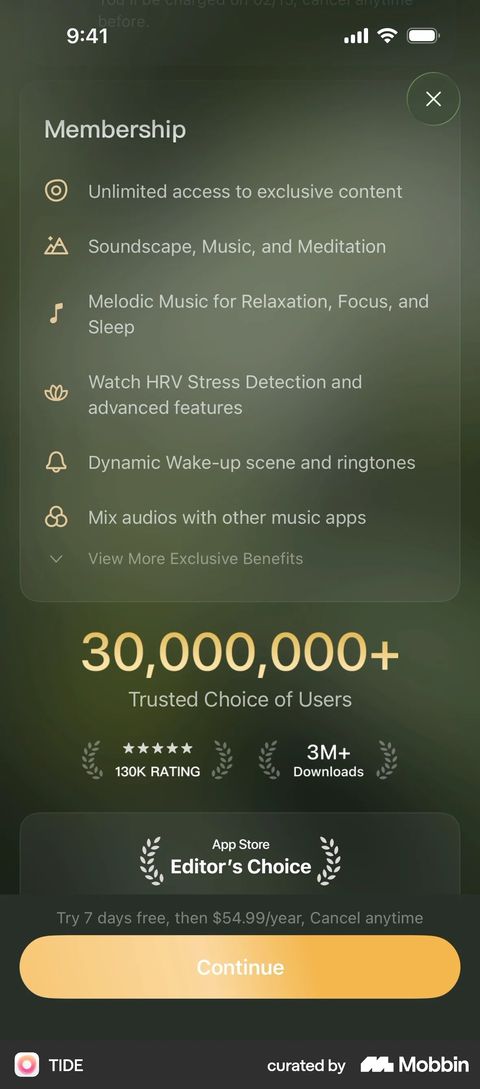
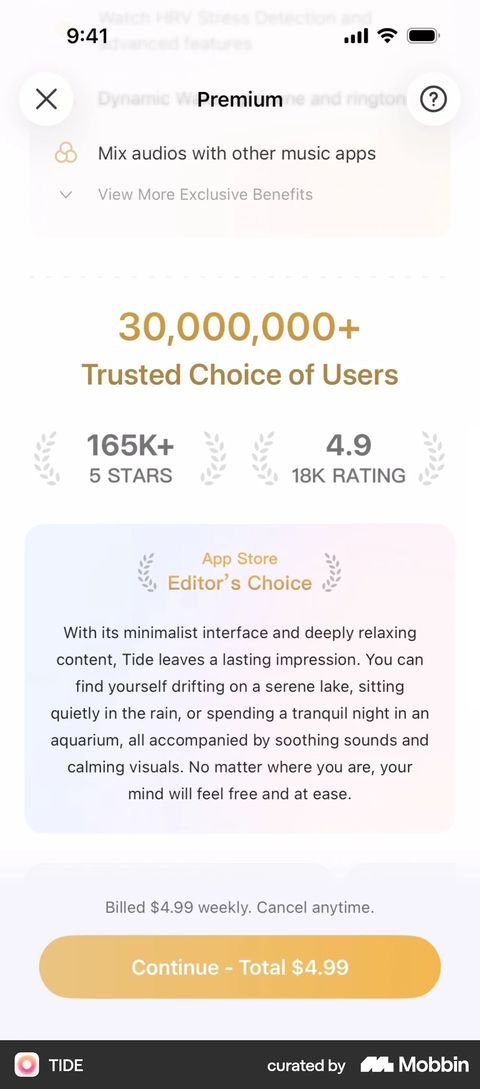
The TIDE paywall in my file pairs the App Store Editor’s Choice card with “130K RATING” and “3M+ Downloads”. A second capture of the same paywall leads with “165K+ 5 STARS” and “4.9 / 18K RATING” instead.
Worth noticing that the two variants are not describing the same thing, and only one of them is a review count. If you are going to quote your own numbers on a paywall, decide which number you mean before you have three versions of it in the wild.
BitePal · when a named result beats a rating
A named customer with a specific measured outcome, 67 kg to 62 kg in one month, sitting alongside the 4.7 rating and the 1M users rather than instead of them.
The rating says people like the app. The named result says the app does something, and it is much harder to earn. Just do not present an exceptional outcome as a normal one.
Orbit · the rating as a floor, not the pitch
Apple’s Favourites laurel and a 4.8 sit above the headline, but the headline is an outcome: customers save $300 a year on average. What it leads to is a one-off Lifetime at S$ 24.98, not a subscription.
The rating here is clearing a bar rather than making the case, which is a reasonable job for it. Two conditions: the figure is honest, and the price is less than the saving. An average that hides the fact most users save nothing fails both.
Copilot Money · the review, reprinted as a review
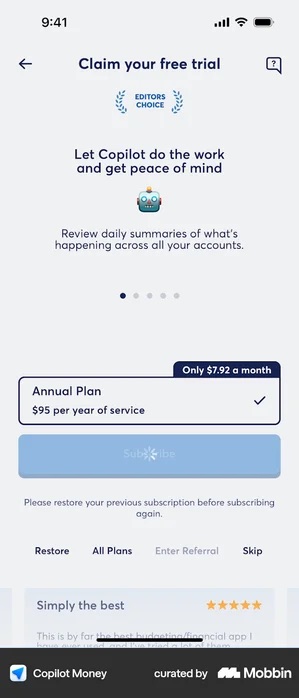
Below the plan sits a card headed “Simply the best”, five stars beside it, and the body: “This is by far the best budgeting/financial app I have ever used”. Apple’s Editor’s Choice laurel sits at the top of the same screen.
Nothing has been rewritten into marketing language. The review’s own title is the headline, the stars are still stars, and the sentence is somebody else’s. This is the practical reason to ask at a moment when the user has something to say: the sentence they type is the sentence you get to reuse.
Strava, Nibble and Thrive Market · what you say before you have the reviews
“150+ million runners, walkers, and other active people on Strava are excited to move with you.” “Join a community of 30+ million learners.” “See why over 1 million members trust us.” Not one of the three is a rating or a review count.
If your review volume is small, this is the honest substitute, and it does not require you to spend a prompt to get it. Bloom does the same thing with 1M users and 2M lessons. A number you already have beats a number you rounded up.
Which loops back to timing: ask after a success the user can name, because that is also the review you will want to reprint.
Review request checklist
- Prompt fires at the end of a completed success, not on launch and not on a tap
- Trigger requires a few repeats before it fires the first time
- Using Apple’s review API, not a custom prompt of your own
- Unhappy users have an always-available way to reach you, not a screen that decides who gets to review
- A user-initiated “Rate this app” row exists in settings, separate from the prompt
- No incentives, and no feature locked behind the ask
- Never triggered after errors, crashes, failed payments or long waits
- Watching ratings volume in App Store Connect before and after the change, not an invented acceptance rate
Got questions? I’ve got answers
When should I ask users for an app review?
After a success the user can name, and never in the middle of a task. Apple's own guidance is to ask “at the end of a sequence of events that they successfully complete” and to avoid asking right after app launch or as the direct result of a tap.
How many times can I show the review prompt?
Apple's StoreKit documentation says the system displays the prompt to a user a maximum of three times within a 365-day period. You choose when and where to call it; the system decides whether it surfaces, and people can disable review requests on their device entirely.
Should I ask for a review before or after the paywall?
After, and after the user has actually got something out of the app. Apple's own sample project waits until someone has completed a task several times before prompting, on the reasoning that a more experienced user gives better feedback.
Is a satisfaction gate against Apple’s rules?
Apple has not named the pattern and banned it. But its review-manipulation clause lists “filtered” feedback alongside paid, incentivized and fake, and its StoreKit best practices say to avoid requesting a review as the result of a user action, which is exactly how a gate is triggered. Treat it as a risk you are choosing to take, not as the safe default it is usually presented as.