What Is an Activation Metric and How Do You Find Yours?
An activation metric is the one in-app action that predicts whether a new user is still there at Day 30. Not a state, an event, and usually an event with a number attached.
The fastest way to see whether a company has found its own is to look at the setup checklist on its home screen. That list is an activation metric made visible: somebody chose the handful of actions worth nagging people about.
What you are probably getting wrong. Counting onboarding completion and calling it activation. Finishing setup is relief, not value, and it will not tell you who stays.
What you will have by the end. A method for finding your number, the threshold question most teams skip, and six live setup checklists to compare yours against.
In short
- An activation metric is a specific first action, with a threshold, that separates users who stay from users who leave. “Activated” is not one, and neither is finishing onboarding.
- Of six setup checklists pulled from live apps, four show a progress counter and exactly one names a number inside a step: Revolut’s “Make 3 card payments”.
- The other five list binary tasks, which is a weaker thing wearing the same clothes. A tick either happened or it did not, and neither answer predicts anything.
- The aha moment is the experience. The activation metric is the number that stands in for it, and it is only as good as the moment it stands for.
“Activated” is not a metric. You cannot optimize what you cannot measure, and “the user got into the app” tells you almost nothing about whether they’ll stay.
An activation metric is the specific in-app action that predicts whether a new user will be retained at Day 30. It’s the concrete event that separates users who stick from users who don’t.
Why this matters more than most founders realize
Most apps track downloads, installs and maybe D1 retention, which is just the share of people who come back the next day. Very few track the action that goes with a user still being there a month later.
Without that, you are optimising blind. You can improve your onboarding completion rate, your push notification acceptance, your first-session engagement, and have no idea whether any of it moves long-term retention.
What an activation metric looks like
It has to be a specific, observable action. Not a state (“the user is engaged”) but an event (“the user completed their first workout”).
The shape it takes, by app type. Habit tracker: three or more habits created in the first session. Fitness app: a full workout completed, not browsed. Budget app: an account connected and the first spending breakdown viewed. Meditation app: a session completed and rated.
Notice that the strongest ones have two parts, an action plus a signal of engagement with the result. Those are illustrations of the shape, though, not validated thresholds. Yours has to come out of your own data.
A few apps say the threshold out loud. Liven follows the first log with the rule attached, “Your first check-in is done! Once a day is enough. One log per day is sufficient for your daily routine completion” which is a product telling its users exactly what counts as active.
Most teams never make that decision explicit, and then cannot measure it. Binance goes the other way and pays for it: “Newbie tasks: Create your first post, +5 points, Claim.”
The action is real enough. But the reward is points, so what the completion rate measures is who wanted the points.
How to find your app’s activation metric
This is work you do with real data, not a guess.
Step 1: Pick the outcome you want to predict
Choose your outcome, typically D30 or D60 retention, or trial-to-paid conversion. This is what you want to predict.
Step 2: List all significant first-week actions
These are the distinct events users can do in their first 7 days: complete first session, add first item, connect an account, set a goal, rate the app, share, invite a friend, and so on.
Step 3: Compare retained vs. churned users
For each action, check: what percentage of users who did this action were retained at D30? What percentage of retained users did this action early on? The action with the biggest gap between retained and churned users is your candidate.
Step 4: Validate the threshold
It’s often not just the action, but how many times or how quickly. “Users who complete 3+ sessions in the first week” might predict retention much better than “users who complete 1 session.” Test different thresholds.
Step 5: Track it going forward
Once validated, the activation metric becomes a core funnel metric, not just a research finding. Track it weekly alongside D30 retention to see if changes you make are moving it.
Averages are lying to you
This is where most founders make a mistake: they look at one overall retention number and think it tells the full story. It doesn’t.
Store is the one split with published numbers behind it, and it is a good demonstration because the gap does not point the same way twice. In RevenueCat’s State of Subscription Apps 2026, median download-to-paid conversion is 2.9% on the App Store against 2.6% on Google Play, and no category shows Android ahead at the median.
Once a trial starts, the advantage is gone: trial-to-paid medians are 32.6% on iOS and 32.5% on Android. By the first renewal it has flipped, with Google Play slightly ahead on weekly plans, 47.7% against 41.4%, before store differences shrink to roughly one or two percentage points by the third renewal.
Ahead, level, then behind, in the same funnel. No single blended number survives that, which is the point: one blended number tells you what mix you had, not what worked.
So when you find your activation metric, look at it by segment, platform, acquisition source, and user type. The metric might mean different things in different cohorts, and optimizing for the average might miss what’s actually working.
Marcus Burke’s cheap version is to ask your onboarding questions in the same brackets your ad platform reports in. Source, age, gender. Then the product data and the ad data lay over each other without a separate analytics project.
What six apps put on the screen
A setup checklist is the most honest artefact a company publishes about its own activation metric. Nobody puts a step on it they do not believe predicts retention.
So I pulled six. The shape is consistent and the gap is the interesting part: four of the six show a progress counter, and exactly one names a number inside a step.
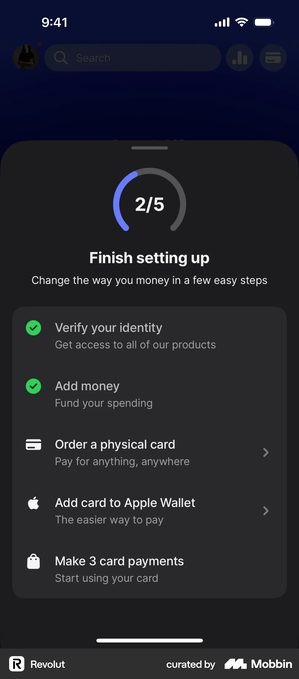
Revolut · the only one that names a threshold
A “2/5” ring over “Finish setting up”, under the line “Change the way you money in a few easy steps”. Verify your identity and Add money are ticked green. Order a physical card and Add card to Apple Wallet are not. Nor is the last one: “Make 3 card payments”, subtitled “Start using your card”.
That is the only step across all six checklists with a count in it. Everything else, everywhere, is binary. A threshold is exactly what separates a setup task from an activation metric, because one card payment proves nothing and three is somebody’s answer to “how many before they stay”.
The good part is that the number can be wrong. Three is a claim about this product, and a claim can be tested: if three predicts nothing, you try two, or five. Almost nobody else in this teardown has put themselves in a position to find out.
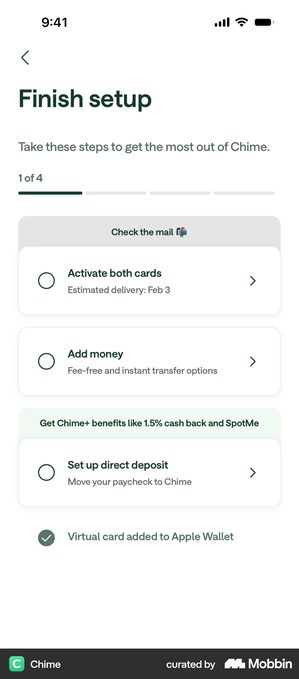
Chime · steps grouped by reason, not by order
“Finish setup”, the line “Take these steps to get the most out of Chime.”, and a “1 of 4” segmented bar. The steps sit under two headed groups rather than in a sequence: “Check the mail” holds Activate both cards and Add money, and “Get Chime+ benefits like 1.5% cash back and SpotMe” holds Set up direct deposit.
Direct deposit is the known activation event for a neobank, and it is the one step given its own group with the benefit written into the header. The grouping is doing the arguing.
Below the list, “Virtual card added to Apple Wallet” is already ticked. You start above zero, which is the oldest trick on a checklist and still works.
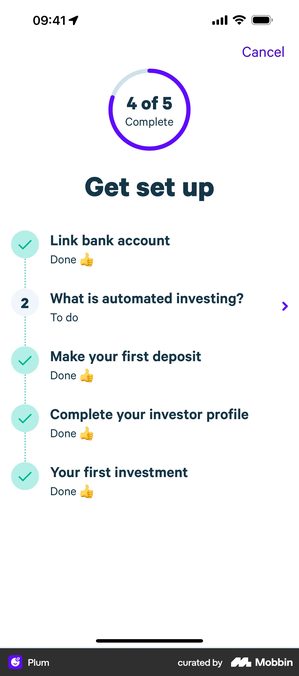
Plum · the only unfinished step is the one that is not an action
“4 of 5 Complete” in a ring over “Get set up”. Four steps read “Done”: Link bank account, Make your first deposit, Complete your investor profile, Your first investment. The one still open, labelled “To do” and numbered 2, is “What is automated investing?”
Every real action is finished and the only thing outstanding is a piece of reading, sitting second in a list whose later items are already done. So it is not a sequence either.
Worth asking what it is doing in a progress count at all. A user who has deposited and invested is activated whether or not they read the explainer, and holding them at 4 of 5 makes the number say otherwise.
Origin, Shopify and Superpower · the same list without the number
Three lists, three different amounts of honesty about what they are:
- Origin shows “1/4” under “Make the most of Origin”, with Link your accounts struck through and ticked, and Create your budget, Meet Sidekick and Refer friends still open.
- Shopify’s “Get ready to sell” runs six steps with Add your first product already ticked, and no counter.
- Superpower lists five, opens with “Tell us about yourself” and the honest subtitle “Set aside 10 min for best results”, and also shows no counter.
All three are setup lists rather than activation metrics. Useful, but the steps are things the company wants from the user, not things that predict the user staying. “Refer friends, earn rewards” is a growth ask sitting in a list that reads like onboarding.
That is the test to apply to your own: would you bet that a user who finishes this list retains better than one who does not? If you would not bet on it, it is a to-do list.
None of this tells you what your number is. It tells you that the apps that look like they know have put a countable action on the screen, and the ones that do not have put a list of chores there instead.
Checklist
- Your activation metric is an event, not a state, and a user could recognise having done it
- It carries a threshold, and you can say why that number and not one either side of it
- It was found by comparing what retained users did against what churned users did, not chosen from what was easy to log
- It would still be worth tracking if you deleted the onboarding around it
- Activation rate is reviewed weekly, segmented by platform, acquisition source and user type
- Onboarding changes are judged by their effect on activation rate, not on completion rate
- If you show a setup checklist, every step on it is something you would bet predicts retention
Got questions? I’ve got answers
What is an activation metric?
A specific, observable first action, with a threshold, that predicts whether a new user is still there at Day 30. “The user got into the app” is not one, because you cannot optimise it and it does not separate the people who stay from the people who leave.
What is the difference between the aha moment and the activation metric?
The aha moment is the experience where the user first understands why your app is worth keeping. The activation metric is the countable event you use as a proxy for it. One is qualitative and one is quantitative, and the metric is only as good as the moment it stands for.
Can activation be a checklist completion?
It can be measured that way and it usually should not be. Finishing setup tasks is relief, not value. Of six live setup checklists, only Revolut’s names a number in a step, “Make 3 card payments”. The rest are binary chores. If your metric would still be worth tracking with the onboarding deleted around it, it is a real activation event.
How do I pick the threshold?
Empirically. Compare retention for users who did the action once, twice, three times and so on in their first week, and look for where the curve bends. If no threshold separates retained from churned users, the action is not your activation metric.