Win-Back Screens: What 8 Apps Show a Subscriber Who Left
Somebody paid you for six months and then stopped. They are still on your list. They still have the app installed. And in most indie apps, absolutely nothing happens next.
It is the easiest group of people you will ever be asked to convince, and the one almost nobody writes to. They know what the app is. They used it. They had a reason to leave, and it is usually not “this was worthless”.
Here is where I think it goes wrong, and it is a sequencing mistake rather than a lazy one. The cancellation save screen gets built, because somebody is standing right there with their hand on the door. The win-back does not, because by then the person is gone and nobody is watching them go.
So I went and pulled eight screens that apps do put in front of a returning subscriber. What follows is what each one leads with, the pattern four of them share, and the one that shows exactly how that pattern fails.
In short
- A win-back is not a save screen. The save screen reaches somebody who is still paying you. This reaches somebody who already stopped.
- Four of the eight lead with what the user already saved, not with what they will get: Swiggy ₹538, Blue Apron $11.49, Natural AI $0.05, and Panera with the date their benefits actually run out.
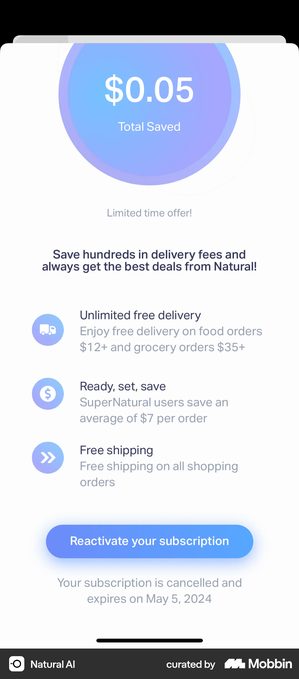
- Natural AI is the cautionary one. A screen headed “$0.05 Total Saved” sits directly above a line promising to “save hundreds in delivery fees”. The personalised number argues against the pitch.
- Before building any of this, check how many of your cancellations were a decision. Billing errors are 32.2% of Google Play cancellations against 15.2% on the App Store. Those people did not leave, they lapsed.
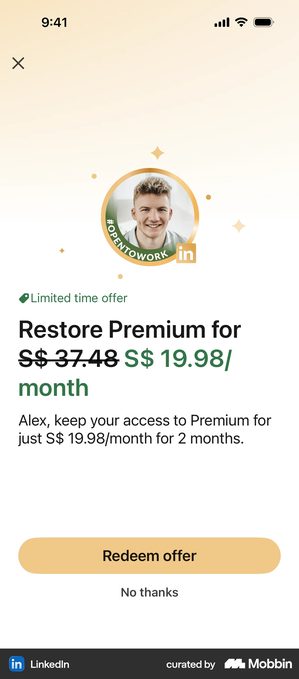
- Every offer here is different from the plan the user cancelled. LinkedIn halves it for two months, Swiggy charges ₹1 for three. Repeating the original price gives them nothing new to say yes to.
First, work out how many actually chose to go
This is the step that comes before any campaign, and skipping it means writing persuasion for people who need a payment form.
Billing errors account for 32.2% of Google Play cancellations and 15.2% on the App Store. Roughly a third of your Play churn, in other words, is a card that expired.
That is churn you can fix with a form rather than an argument. Those people did not weigh it up and decide against you. Many of them do not know it happened. They need a sentence telling them, and one tap to fix it. No discount, no argument, no “we miss you”.
Get that group out of the way first. What is left is the group this article is about.
What the screens actually lead with
The first thing on the screen is the decision. Here is what eight apps chose.
The ones that lead with what you already got
This was the pattern I did not expect, and four of the eight use it. Instead of describing the subscription, they hand you a number about your own past.
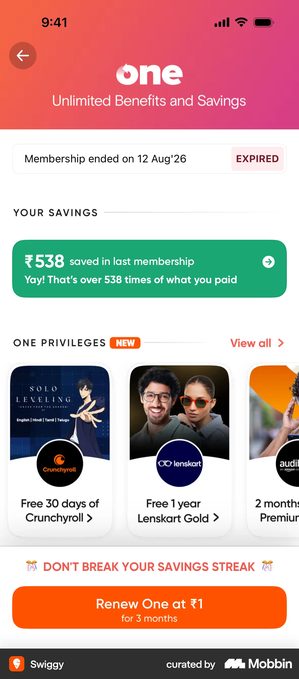
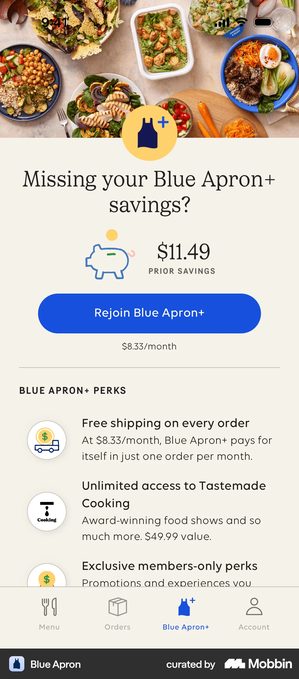
Both work because the number is bigger than the price. Which is the condition nobody states, and the next screen is what happens when it is not met.
Natural AI · the personalised number that argues the other way
A gradient circle fills the top of the screen with one figure: $0.05 Total Saved.
Directly under it, in bold:
“Save hundreds in delivery fees and always get the best deals from Natural!”
Then three benefit rows, a Reactivate your subscription button, and the line “Your subscription is cancelled and expires on May 5, 2024”.
The app personalised the one number on the screen, and the number it produced is five cents. It sits two lines above a promise to save you hundreds, and the user is the only person in the room who can see both at once.
The ones that lead with what you have not lost yet
A different opening, and the honest one. Rather than selling the return, these name the window the user is still inside.
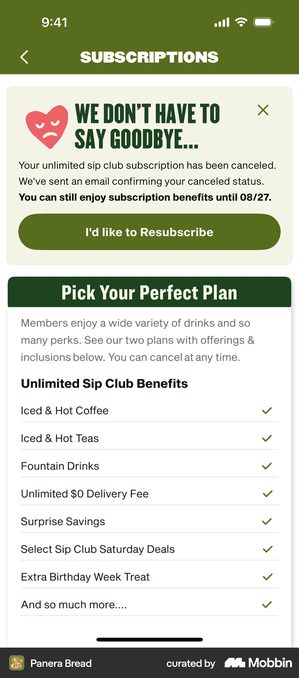
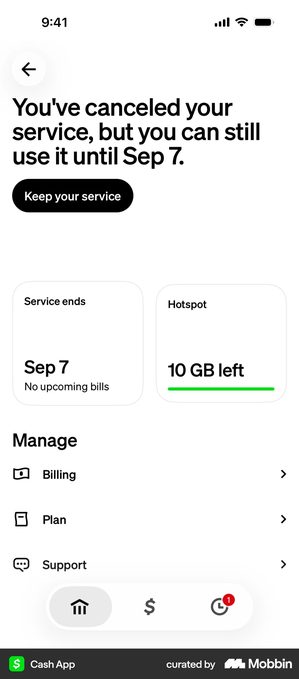
Notice what neither of them does. There is no discount on either screen, and no urgency language. The argument is just the remaining value, which is a thing the user can verify.
The ones that lead with the offer
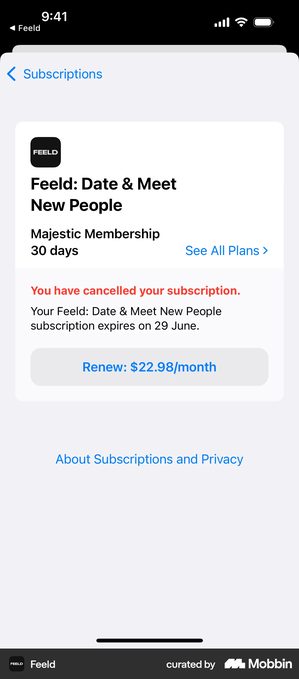
What to send, and when
Five of these eight screens live inside the app, which means they are not really a campaign. They fire when an expired subscriber opens the app, whenever that is.
That is the cheapest version to build and the one I would build first. It needs no list, no sending schedule and no deliverability. Somebody opened your app after their subscription ended, which is about the clearest signal of intent you will get.
If you are sending rather than waiting, the shape that keeps coming up is this one.
The sequence, and where most apps stop
Two messages. The third is where a win-back turns into being chased.
Sort the lapsed from the leavers
Billing failures get a notice and a one-tap fix, not a pitch. On Play that is roughly a third of them.
Name the gap, then the offer
“It has been a while” beats “we miss you”, because one of them is a fact. Offer something different from the plan they cancelled.
Then stop
If what changed since they left is genuinely worth a sentence, this is where it goes. After this, they have answered.
Whether any of this is worth building is a question with a number attached, and it is not on this page. Reactivation rate, which is the share of people who churned and then came back within a year, is the one that decides it. And it depends almost entirely on which plan they were on.
Three groups, three different problems
A single win-back message treats all of these as the same person, and they are not.
The ones who used it a lot and then left. Most likely to come back, and the least likely to need a discount. Lead with what changed. Swiggy's screen is built for this person: it assumes the membership was worth it and shows them the proof.
The ones who barely used it. A discount does not fix this, because price was not the problem. The honest move is to ask what got in the way, and to accept that the answer is often that the app never fitted into their week.
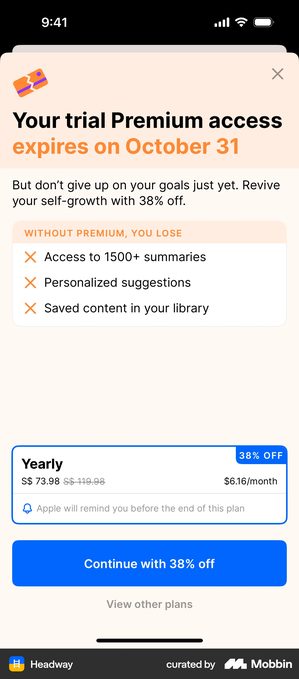
The ones who trialled and never paid. They saw the whole thing and said no. Anything you send has to be meaningfully different: a lower price, a shorter commitment, or something that did not exist when they looked. Headway's screen is this one, reframing an expiring trial as a discount rather than an ending.
What I would not copy
A savings figure with no floor under it. Natural AI is the whole argument. Personalise the number and you have to accept whatever the number says, so set a threshold and show something else below it.
Urgency you cannot keep. “Limited time offer” on a screen that appears every time the app opens is a claim the user can check by closing the app and opening it again.
A third message. Two is a win-back. Three is a different thing, and the people who were going to come back have already come back.
Pretending nothing happened. Panera confirms the cancellation and names the email it sent before it asks for anything. That costs one sentence and buys the right to make the ask at all.
Win-back checklist
- Billing failures are separated from real cancellations before anybody writes copy
- Lapsed cards get a notice and a one-tap fix, with no discount attached
- There is a screen inside the app for an expired subscriber who opens it, not only an email
- Any personalised savings figure has a floor, and a fallback for the users below it
- The offer differs from the plan they cancelled, in price, in term, or in what it includes
- The cancellation is acknowledged before the ask, and the decline is visible and plainly worded, the way LinkedIn’s “No thanks” is
- Two messages, then stop
- Reactivation rate is being measured, so you can tell whether any of this paid for itself
Got questions? I’ve got answers
What is a win-back campaign?
The messages and screens you put in front of somebody whose subscription has already ended, to get them to come back. It is not the same as a cancellation save screen, which reaches a subscriber whose hand is still on the door. By the time a win-back runs, they are gone and the billing has stopped.
How long should you wait before a win-back message?
Long enough that it does not read as a reflex, short enough that they still remember the app. Three to seven days is the common shape. Several of the apps here do not wait at all, because their screen lives inside the app and fires whenever an expired subscriber opens it.
What should a win-back offer be?
Something different from the standard subscription, or there is no reason to reconsider. Of the eight screens here, LinkedIn halves the price for two months, Swiggy charges ₹1 for three months, and Headway reframes a 38% discount against a trial that is about to expire. A straight repeat of the original price is the one version that gives the user nothing new to say yes to.
Should you show the user what they saved?
Only if the number is big enough to carry the argument. Four of these eight lead with a personal savings figure, and Natural AI shows what happens when it is not: a screen headed $0.05 Total Saved, directly above a line promising to save you hundreds. The number the app chose to personalise is the number that disproves its own pitch.